Musikhaus Keks
Welcome!
Our cookies offer you a fast, relaxed and full-featured shopping experience. Some are necessary to operate the website and its functions. Others help us to improve our services. If you agree to this, simply consent to the use of cookies for preferences, statistics and marketing by clicking on "OK". Alternatively, you can deactivate individual cookies under "Customise cookies" or all cookies, except those required for the function of our website, under "Reject all".
Musikhaus Korn DJ Guide

DJ Controller With or Without a Laptop? Compare Controllers and Standalone Systems

With a traditional DJ controller, a laptop, tablet or smartphone handles music management and DJ software. A standalone system, by contrast, has its own display, players, mixer and operating system and can be used without a laptop during the set. Both concepts can make sense from a bedroom setup to professional events. The deciding factors are software, mobility, music source, connections and your personal workflow.

Software controllers & standalone explained Compare USB, streaming & connections For bedroom, mobile & club DJs
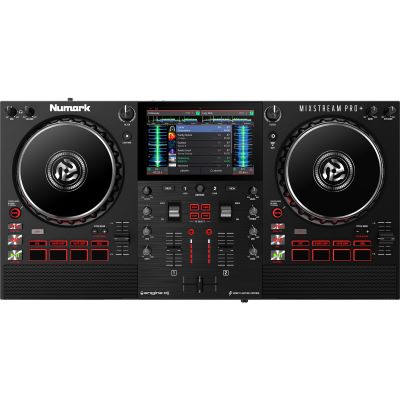
Numark Mixstream Pro Plus standalone DJ system with integrated display and speakers
1 Laptop can provide library, display and processing power
0 Laptops required for independent standalone operation
2 Basic decks are enough for classic transitions
1 Goal: the fastest reliable workflow for you
The Quick Decision

Is a DJ Controller Better With or Without a Laptop?

Neither system is fundamentally better. A controller plus laptop offers extensive software flexibility and a large screen. Standalone systems reduce the number of devices required during a set and allow direct operation with USB, SD or supported online music sources.

Software Workflow

Controller With Laptop

Ideal if you manage your music directly on a computer, want to use a specific DJ application or make intensive use of functions such as stems, large waveforms, samplers and software effects.

  • Large library view.
  • Flexible software choice.
  • Often a more affordable hardware entry point.
  • Easy expansion through software functions.
Independent Workflow

Standalone Without Laptop

Ideal if you do not want an open computer during the set, prefer to start music from USB or SD and want a more self-contained hardware system.

  • Integrated display.
  • Dedicated DJ operating system.
  • Fewer devices on the DJ table.
  • Often more extensive professional connections.

Quick recommendation: if you already have a suitable laptop, a software controller provides a particularly flexible and comparatively affordable starting point. If you deliberately want to DJ without a computer and learn an independent player-and-mixer workflow, a standalone system is worth considering.

The Computer Takes Over Part of the System

How Does a DJ Controller Work With a Laptop?

The controller provides knobs, jog wheels, faders and audio connections. Music management and many of the actual DJ functions run in the software on the computer.

Library & Processing

The Laptop Is Music Library, Display and Processing Platform

Tracks are loaded, analysed and assigned to virtual decks inside the DJ software. The controller sends operating commands to the software while an integrated audio interface can output the Master and headphone signals separately.

Large Display

A Laptop Makes Music Management Particularly Clear

Playlists, search fields, waveforms, stems and several decks can be displayed clearly on a notebook screen. DJs who search large libraries frequently during a set can benefit strongly from the additional screen space.

Software Ecosystem

Software Determines Many of the Functions

Two controllers with similar hardware can feel quite different when one is designed around rekordbox and another around Serato, TRAKTOR or a mobile application. Check the officially supported software and included licence level before buying.

Laptop DJing is particularly useful if you already own a suitable computer, use stems and software effects extensively, search your library frequently during a set or want to access as many functions as possible with a relatively modest hardware budget.

Player, Mixer and Screen in One Device

How Does a DJ Controller Work Without a Laptop?

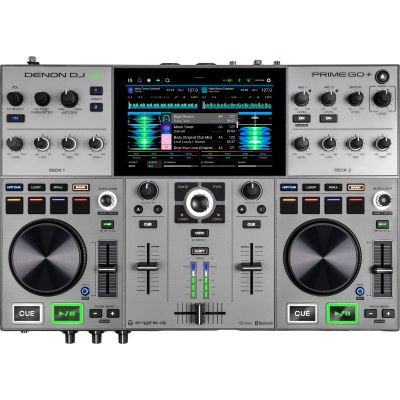
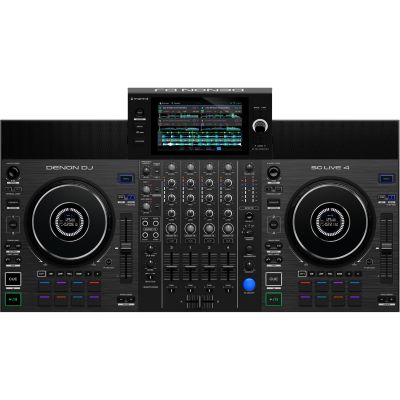
Strictly speaking, this is usually a standalone or all-in-one DJ system. It contains its own operating system and can load tracks, display prepared libraries and play audio without being connected to a computer during the performance.

  • Load music from USB or supported SD media.
  • Select tracks directly on the integrated display.
  • Control Cue, loops, hot cues and effects on the unit.
  • Use Wi-Fi and supported streaming services on selected models.
  • Connect Master, Booth and microphones directly where provided.

Without a laptop does not mean without preparation: a computer can still be useful for library management, exports, firmware updates and detailed preparation. It simply does not need to remain open during the actual set.

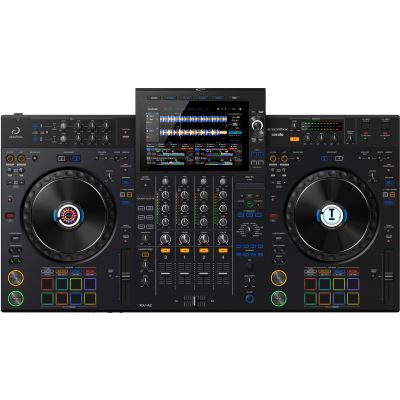
AlphaTheta XDJ-AZ professional standalone DJ system with integrated display decks and mixer
A standalone system combines display, players, mixer and playback software in one self-contained DJ workstation.
You Do Not Always Have to Choose Permanently

Which DJ Systems Work Standalone and With a Laptop?

Many modern all-in-one systems can operate independently and can additionally connect to compatible DJ software. This allows you to switch between two workflows depending on the situation.

At the Gig

Standalone for the Performance

Music is prepared on USB or SD media, the laptop remains in the case and the complete set workflow runs on the integrated display and hardware controls.

At Home or in the Studio

Software Mode When You Want It

Depending on the model, the same system can also operate with compatible DJ software and provide access to additional computer-based functions.

Backup & Flexibility

Several Music Sources Can Reduce Dependence on One Workflow

Multiple operating modes can be useful, but every workflow you plan to rely on should be tested completely before an important event or club set.

Where Are Your Tracks Stored?

Laptop, USB Drive, SD Card or Streaming Service?

Computer

Laptop Library

Particularly comfortable for large music collections, spontaneous searches and software-based functions. The music remains directly available on the computer.

Standalone Standard

USB Drive

The classic standalone workflow. Playlists and track data are prepared beforehand and can then be used without an open computer.

Additional Medium

SD Card

Some systems additionally provide an SD card reader. This can be useful when USB ports need to remain free for additional media or back-to-back sets.

Online Catalogue

Streaming Services

Wi-Fi-enabled systems can access supported music catalogues depending on the manufacturer and service. For important performances, keep a local music selection available as an independent backup.

Direct Comparison

Laptop Controller or Standalone DJ System?

The differences are less about sound quality than about workflow, software dependence, screen size, music sources and how many separate devices you want to use.

Feature Controller + Laptop Standalone
Computer During the Set Usually required Not required
Display Large laptop screen Integrated display
Software Flexibility Very high Depends on the operating system
Hardware Entry Price Often lower Usually higher
Setup Controller + computer + cables Central unit
USB Media Not the main workflow Typical standard
Stems Very flexible depending on software Model dependent
Club-Like Workflow Model dependent Very close on suitable all-in-one systems
Choose According to Application

Which Solution Fits Your DJ Workflow?

DJ Beginner

Controller + Existing Laptop

If you already own a suitable laptop, a two-deck controller provides a large amount of functionality for a manageable initial investment.

Bedroom DJ

Choose According to Budget and Desk Space

Laptop controllers often save money and hardware space. Standalone becomes interesting when you deliberately want the DJ desk to operate without an additional computer.

Mobile DJ

Both Concepts Work

XLR Master outputs, a Booth output, microphone inputs, fast setup and a reliable backup strategy become more important than whether the system uses a laptop.

Club-Oriented DJ

Standalone Can Train a Hardware-First Workflow

An all-in-one system with a club-oriented layout can combine laptop-free operation with preparation for separate player-and-mixer booths.

Hardware and Software as an Ecosystem

Brands for Controllers and Standalone DJ Systems

Avoid These Before Buying

Typical Mistakes With Laptop and Standalone DJ Setups

Mistake 1

Confusing a Controller With a Standalone System

A USB connector or display does not automatically mean that a device can load and play music independently without a computer.

Mistake 2

Changing Systems Only Because You Fear Laptop Problems

A properly configured computer can operate very reliably. Standalone hardware also requires preparation, updates and backups.

Mistake 3

Ignoring Software Compatibility

Not every controller works with every DJ platform with the same range of functions.

Mistake 4

Using Streaming as Your Only Music Library

A network problem or unavailable service should not be able to stop an important performance completely.

Mistake 5

Underestimating Display Size

If you frequently search large libraries, test whether the integrated standalone display suits your preferred browsing workflow.

Mistake 6

Checking Connections Only After Buying

Master, Booth, microphone and external inputs can be more important to your real setup than many additional performance functions.

Frequently Asked Questions

Answers About DJ Controllers With and Without a Laptop

Does Every DJ Controller Need a Laptop?

Traditional software controllers require a computer or compatible mobile device. Standalone and all-in-one systems instead provide their own playback and music-management functions.

How Can I Tell Whether a DJ System Works Standalone?

Look for an integrated DJ operating system, display and the ability to load music directly from USB, SD or other supported sources. The product description should explicitly state that standalone operation is supported.

Is Standalone More Reliable Than a Laptop?

Not automatically. Both systems can operate reliably when they are prepared correctly. Stable software, tested storage media, current firmware and a sensible backup path are more important than the basic system type.

Is a Standalone System Suitable for Beginners?

Yes. It is usually more expensive than a simple controller, however. If you already own a suitable laptop, a software controller often provides a particularly economical route into DJing.

Can a Standalone System Still Work With a Laptop?

Many current models additionally support DJ software or library connections to a computer. The exact functionality depends on the individual product.

Can I Use Streaming Services Without a Laptop?

With some Wi-Fi-enabled standalone systems, yes. Which services are available depends on the manufacturer, firmware, region and the user account or subscription being used.

Which Solution Is Better for a Mobile DJ?

Both approaches can work. Standalone reduces the number of main devices while laptop-based systems offer very flexible software and library functions. Master, Booth and microphone connections are particularly important for mobile applications.

Which Solution Is Better for Stems?

Laptop systems currently provide many flexible software-based possibilities. Some modern standalone systems also integrate corresponding performance functions. Compare the exact functionality of the specific models you are considering.

Do I Still Need DJ Software With a Standalone System?

Not necessarily for the actual performance. Software can still be very useful for music management, analysis, playlist preparation and exporting media.

Which System Is Better Preparation for Club DJing?

A club-oriented standalone system can train browsing and hardware-first operation directly on the device. With a controller, you should nevertheless learn Cue, pitch, EQ and track selection confidently without depending entirely on visual aids.

Your Workflow Matters More Than the Screen

DJ Controller With or Without a Laptop? Comparison

A controller plus laptop is particularly useful if you want software flexibility, a large library view and functions such as stems, samplers or extensive software effects. If you already own a suitable computer, it can also provide a comparatively affordable route into a powerful DJ workflow.

Standalone systems are attractive if you deliberately want to work without a laptop during the set. Insert a USB drive or supported SD card, select tracks directly on the display and perform using the integrated mixer and deck sections. This reduces the number of main components and comes particularly close to an independent player workflow.

Many modern systems now combine both approaches. Do not decide solely according to “laptop yes or no”. Compare software, music source, connections, mobility and your longer-term goal as a bedroom, mobile, club or performance DJ.

More Buying Advice and Practical Knowledge

Discover More Musikhaus Korn Guides

From DJ controllers and standalone systems to club, vinyl and performance setups as well as recording, musical instruments and event technology, the central Musikhaus Korn guide contains further comparisons and decision-making aids.