Record and Edit Audio in Detail
Cubase, Pro Tools and Fender Studio Pro are typical candidates for musicians who record extensively, edit, comp, arrange and then work in a conventional mixer environment.

Ableton Live, Cubase, Logic Pro, FL Studio, Bitwig, Pro Tools, Fender Studio Pro or Reason? Almost every modern DAW can record audio, edit MIDI, load plug-ins and mix complete songs. The decisive difference is therefore less about whether a particular feature exists and more about how quickly and intuitively the software helps you reach your musical goal.
Most established DAWs are powerful enough for complete productions. Use your preferred way of working as the first filter.
Cubase, Pro Tools and Fender Studio Pro are typical candidates for musicians who record extensively, edit, comp, arrange and then work in a conventional mixer environment.
Ableton Live and Bitwig combine linear arrangement with non-linear production. Loops, samples, automation and spontaneous variations can be explored particularly directly.
FL Studio is particularly well known for pattern- and Piano-Roll-based workflows. Ableton Live and Bitwig are strong alternatives when sampling and performance become more important.
Logic Pro is attractive to Mac users who want a large collection of instruments, effects, samples and conventional recording tools inside one integrated environment.
Test two or three candidates with the same small project. Import a beat, record vocals or guitar, program MIDI, automate an effect and export the mix. The DAW that makes you think least about operating the software often fits you best.
DAW stands for Digital Audio Workstation. It combines recording, MIDI sequencing, arrangement, editing, virtual instruments, effects, automation, mixing and export within one project.
Microphones, guitars, synthesizers or a complete band enter the DAW as individual tracks through an audio interface .
Notes, velocity, controller data and automation control virtual instruments or external synthesizers without containing an audio signal themselves.
Levels, panorama, EQ, dynamics and effects are combined before the multitrack project becomes a stereo or multichannel mix.
Practically every established full version can be used to create professional productions. Differences are more apparent in operating logic, MIDI tools, audio editing, included sounds, live functions, notation, hardware integration and licensing model.
Workflow should matter much more when choosing a DAW than the idea of a general “DAW sound”. Audible differences mainly arise from instruments, plug-ins, internal settings, pan laws, time-stretch algorithms, export settings and, of course, your mixing decisions.
Do not choose the DAW with the most functions. Choose the DAW in which you can finish your music most efficiently.
| DAW | Particular Strength | Suitable For | Platform |
|---|---|---|---|
| Ableton Live 12 | Session View, warping, performance | EDM, live performance, sampling and creative production | Windows / macOS |
| Cubase 15 | MIDI, audio, composition and recording | Bands, producers and composers | Windows / macOS |
| Logic Pro | Integrated Apple ecosystem | Songwriting, recording and all-round production | Mac / iPad |
| FL Studio 2026 | Pattern workflow and Piano Roll | Beats, hip-hop and EDM | Windows / macOS |
| Bitwig Studio 6 | Modulation and modular workflows | Sound design, electronic music and performance | Windows / macOS / Linux |
| Fender Studio Pro | Integrated recording and mixing workflow | Songwriters, bands and all-round studios | Windows / macOS |
| Pro Tools | Audio editing and large studio workflows | Recording, editing and post-production | Windows / macOS |
| Reason 14 | Virtual rack and sound design | Synths, beats and creative production | Windows / macOS |
The DAW comparison above is a workflow guide. The current Musikhaus Korn sequencer range contains the Ableton Live 12 family. Software availability in the shop can change independently of the comparative guide.
If you mainly record real instruments, fast comping, comfortable editing, clear routing and reliable multitrack recording are important.
Cubase, Pro Tools and Fender Studio Pro are particularly traditional candidates for this type of workflow.
Ableton Live can of course also handle multitrack recording, comping and complete mixing, but its Session View and clip-oriented tools make the overall workflow feel different.
If you record a complete drum kit or band, the combination of DAW and multichannel audio interface also needs to work reliably. Driver stability and low monitoring latency then matter more than another large collection of synthesizers.
Particularly strong when you want to combine loops spontaneously, warp audio flexibly, cut samples and later use the same song in a live-performance environment.
Pattern-based production and an extensive Piano Roll make FL Studio a popular tool for beats, trap, hip-hop and EDM.
A strong choice for producers who want to combine modular modulation, clip workflows and experimental sound design closely with arrangement and performance.
A particularly natural candidate for extensive MIDI projects, composition, arrangement, notation and productions containing many virtual instruments.
Mac users receive a broad collection of integrated instruments, effects, loops and tools for songwriting and composition.
The virtual rack is aimed especially at musicians who regard synthesis, virtual cabling, effect chains and creative sound design as part of the composition process itself.
When the DAW is not only used for producing music but also functions as an instrument on stage, clip launching, controller integration, tempo synchronisation and spontaneous arrangement changes become particularly important.
Ableton Live is one of the best-known solutions for precisely this workflow. Session View can launch clips and scenes independently of the linear Arrangement View.
Bitwig also follows a flexible clip- and performance-oriented approach and is particularly interesting when modulation and experimental sound design are part of the live concept.
If you want to improvise, recombine loops spontaneously and control parameters directly with hardware, however, it is worth choosing software whose operating concept has been designed around performance from the beginning.
Not every DAW runs on every operating system. Logic Pro is closely tied to Apple, while Bitwig additionally supports Linux. Check your platform first.
Check the VST, AU or other plug-in formats you require and whether your existing instruments and effects are supported in the new environment.
Drivers and operating system must suit the DAW. Particularly for multitrack recording, low latency and stable drivers are more important than another collection of instruments.
Deep DAW integration can accelerate the workflow considerably. Transport, mixer, instruments and plug-ins can then be controlled without constantly returning to the mouse.
Live is available in several licence levels. Intro is designed for smaller projects, Standard provides a significantly larger production environment, and Suite expands the system with additional instruments, effects, sounds and Max for Live.
MIDI keyboards and DAW controllers can directly operate mixer functions, transport, instruments, effects and clips. What matters is how deeply the particular hardware integrates with your preferred software.
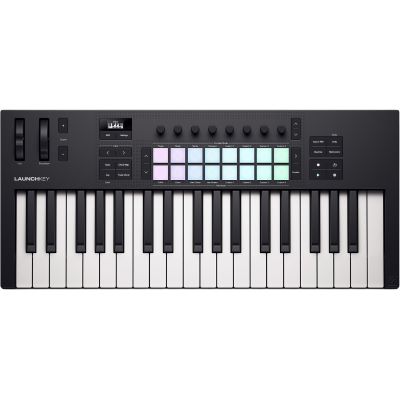
Keyboard, RGB pads and encoders with integration for Ableton Live, Logic Pro, FL Studio, Cubase and additional DAWs.
Compact controller with encoders and DAW scripts for direct control of software, instruments and production functions.
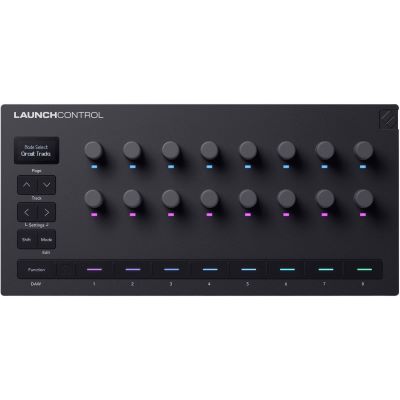
Software synthesizers, pianos, drums, orchestral instruments and sample instruments expand the sound palette available inside your DAW.
EQ, compression, reverb, delay and creative sound processing can be expanded flexibly with additional plug-ins.
Loops, one-shots, instrument samples and sound libraries provide source material for beats, sound design and complete arrangements.
Faders, pads, encoders and keyboards make software parameters directly accessible and reduce dependence on mouse and keyboard.
Connect microphones, guitars, synthesizers, studio monitors and headphones to the computer and directly to your DAW.
Play software instruments and, depending on the model, control the DAW mixer, transport, clips and plug-in parameters.
For mixing and production, you need monitoring on which balance and tonal decisions can be judged reliably.
Closed models help with recording, while open reference headphones complement mixing and detailed checking.





A clear operating concept is more important than the name of the software. Ableton Live Intro is a good option for beginners interested in loops and beats. Logic, Cubase, FL Studio and other programs also provide scalable entry points. Trial versions are particularly useful when deciding.
Ableton Live and Bitwig are particularly strong for clips, modulation and performance. FL Studio is especially well suited to pattern- and Piano-Roll-based production.
Cubase, Pro Tools and Fender Studio Pro are classic candidates for extensive audio recording. Ableton Live also works well, especially when recording is combined with electronic production.
Logic Pro is closely integrated into the Apple ecosystem. Ableton Live, Cubase, FL Studio, Bitwig, Pro Tools and other DAWs are also available on current Macs and may fit a particular workflow better.
Ableton Live is particularly widespread because of Session View and extensive controller integration. Bitwig is likewise designed around flexible clip and performance workflows.
Yes, although complete projects cannot always be transferred without changes. Audio stems, MIDI files and, in some cases, DAWproject can make the exchange easier. Proprietary plug-ins and automation may require additional work.
Not necessarily for MIDI programming alone. However, an audio interface is highly useful for microphones, guitars, high-quality headphone and monitor connections and low recording latency.
Often yes for complete productions. Good DAWs include EQ, compression, reverb, delay and instruments. Additional plug-ins become interesting when you need particular sounds, specialist processors or different workflows.
Cubase is traditionally very strong for MIDI, composition and extensive arrangements. Logic Pro also provides a complete environment for composition and virtual instruments.
No. A smaller edition may already contain every function you actually need. Workflow, required track count, instruments, effects, expansion options and licence model are what matter.
Intro is suitable for getting started and for manageable projects. Standard is significantly more flexible for extensive productions. Suite is particularly interesting if you want many integrated instruments, effects, sound libraries and Max for Live.
For pure speech production, a clear audio workflow is more important than extensive MIDI and synthesizer features. Practically every established DAW can record, edit, process and mix spoken audio.
For electronic music, sampling and live performance, Ableton Live is a particularly interesting choice. FL Studio focuses strongly on pattern- and beat-based production, while Bitwig combines flexible modulation with experimental workflows. Cubase is a powerful all-rounder for recording, MIDI, composition and mixing.
Mac users should include Logic Pro in their comparison. Pro Tools remains a familiar workflow for conventional audio recording, editing and large studio projects. Fender Studio Pro combines recording, producing, mixing and mastering in a modern environment, while Reason takes a particularly distinctive approach to instruments and sound design with its virtual rack.
The decisive factor is not the theoretically best DAW but your personal workflow. Download trial versions, use the same audio and MIDI tracks and check how quickly you understand recording, arrangement, automation and export. Software whose operating logic suits you will save more time in the long term than an especially long feature list.
Also plan the complete setup around the DAW: an audio interface for recording, MIDI or DAW controllers for instruments and hands-on operation, studio monitors or headphones for monitoring and the plug-ins and sounds your productions require. The DAW is the central environment that connects all of these components.
Discover further Musikhaus Korn guides covering audio interfaces, studio microphones, studio monitors, headphones, MIDI, recording and complete music production.