Which Audio Interface Is Right for Me?
Bring recording sources, connections, monitoring and future expansion together in one sensible setup.

An audio interface connects microphones, guitars, synthesizers, headphones and studio monitors to your computer or mobile device. This guide takes you from the required number of channels through USB, Thunderbolt and MIDI to a correctly connected recording setup.
Start with the question that matters most to your current setup. Each topic helps you narrow down the connections, channel count and functions you actually need.
Bring recording sources, connections, monitoring and future expansion together in one sensible setup.
Count signals that must be recorded simultaneously, rather than the number of tracks you may add later inside your DAW.
Check the physical connector, supported protocol, drivers and compatibility with your computer before buying.
Choose suitable microphone preamps, 48 V phantom power, headphone monitoring and enough headroom for clean vocal recordings.
Record passive electric guitar or bass directly through a dedicated instrument input and use amp simulations in your DAW.
Plan enough microphone preamps, monitor outputs and digital expansion when several musicians need to be recorded at the same time.
Combine audio signals and MIDI control data when integrating synthesizers, drum machines and other hardware into your studio.
Connect the computer, microphones, instruments, headphones and studio monitors in a safe and logical order.
An audio interface amplifies low-level microphone signals, converts analogue audio into digital data and sends the finished mix back to headphones or studio monitors.
Voice, guitar, synthesizer or another instrument provides the original signal.
Mic, Line or Hi-Z must be selected to suit the connected source.
The gain stage raises the incoming signal to a useful recording level.
Analogue audio is converted into digital data for processing by the computer.
Recording, editing, effects and mixing take place in your recording software.
The interface sends playback to headphones or active studio monitors.
The source, input and monitoring path must still match. A microphone needs a microphone preamp, a passive guitar needs a Hi-Z instrument input and a synthesizer normally uses Line inputs. Setups with several musicians may also require additional headphone amplifiers, preamps or digital expansion.
Start with the sources you want to record simultaneously. This usually makes the required channel count and connection types much clearer.
Look for good microphone preamps, 48 V phantom power, a convenient headphone output and, for streaming or online content, potentially a loopback function.
Two combination sockets or a microphone input plus a dedicated Hi-Z instrument input allow vocals and guitar to be recorded together.
A stereo synthesizer normally occupies two Line inputs. DIN MIDI can be useful for controlling, synchronising and sequencing external hardware.
Eight microphone inputs, several monitor outputs and ADAT expansion can make a major difference when a complete band or drum kit is recorded simultaneously.
Only signals that have to be recorded at the same time determine the required number of physical inputs. Tracks added later by overdubbing in the DAW do not increase the interface input count.
| Recording Project | Simultaneous Signals | Recommended Input Count | Important Features |
|---|---|---|---|
| Voice-over or Vocals | 1 microphone | 1–2 inputs | XLR, microphone preamp, 48 V phantom power and headphone output |
| Vocals and Guitar | 2 sources | 2 inputs | Microphone input, Hi-Z input and Direct Monitoring |
| Two-Person Podcast | 2 microphones | 2–4 inputs | Two microphone preamps, loopback and a suitable headphone path |
| Stereo Synthesizer + Vocals | 3 signals | 4 inputs | Stereo Line inputs, microphone input and, where required, MIDI |
| Drums or Small Band | 4–8 signals | Multichannel interface | Multiple preamps, outputs and preferably digital expansion such as ADAT |
| Large Hardware Studio | 8–16+ signals | Rack or routing system | Extensive Line I/O, digital I/O and flexible routing software |
The best connection depends on the computer, operating system, required channel count and the interface manufacturer's driver support.
A flexible standard for home studios, laptops and mobile production, available from compact two-channel models to extensive rack systems.
Designed for compatible computers and selected professional systems where the manufacturer has specifically implemented Thunderbolt connectivity.
ADAT, AES, S/PDIF and MADI are useful for adding channels, converters or digital routing to larger recording systems.
Always check which protocol the interface actually uses, which cable is supplied and whether your computer, operating system and available drivers are supported.
A microphone preamp raises low-level microphone signals to a usable level. Many condenser microphones additionally require 48 V phantom power.
Passive electric guitars and basses should normally be connected to an input designed for high-impedance instrument signals. A standard Line input is not automatically suitable.
Synthesizers, drum machines and external preamps normally provide Line-level signals. Remember that a stereo instrument occupies two input channels.
Direct Monitoring routes the input signal to the headphone or monitor path without the full software round trip, helping to minimise distracting latency.
Loopback can combine computer audio internally with microphones or instruments, which is useful for streams, tutorials, podcasts and other online content.
ADAT can add further audio channels through compatible converters or preamps. MIDI transfers note, controller and synchronisation data rather than the actual audio signal.
Begin with the monitoring level turned down. Install the manufacturer's driver where required, then connect the input sources, headphones and studio monitors to the correct sockets.
Check the system requirements, install the current manufacturer driver when required and connect the interface directly to a suitable computer port.
Connect microphones to Mic inputs, passive guitars and basses to Hi-Z instrument inputs and synthesizers or other Line-level hardware to Line inputs.
Connect headphones to the dedicated Phones output and active studio monitors to the intended, preferably balanced Line outputs.
Choose the interface as the recording and playback device, activate the required input channel and set the gain with sufficient headroom.
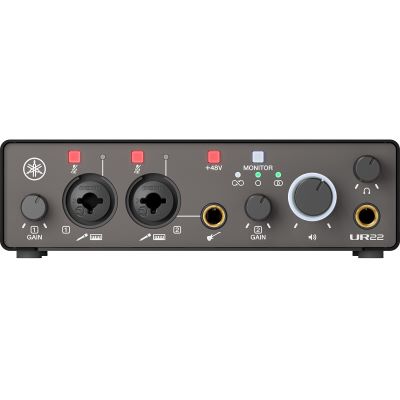
When powering a studio on, switch active monitors on last. When powering down, switch them off first. Use phantom power only with compatible equipment and reduce the output level before changing connections.
Browse by computer connection, expansion format or the studio equipment that completes your recording chain.
Desktop, mobile and multichannel models for a wide range of recording setups.
Professional systems for compatible computers and selected studio workflows.
Internal audio solutions for permanently installed studio computers.
ADAT, AES, S/PDIF and MADI solutions for larger professional systems.
Microphones for speech, vocals, instruments, podcasting and studio production.
Closed and open headphones for recording, editing and critical monitoring.
Active loudspeakers for production, mixing and everyday studio monitoring.
Keyboards, controllers, interfaces and accessories for software and hardware control.
The selection is grouped by channel count and typical application. Check the respective product page for the current specification, included accessories and compatibility information.
Explore established brands for compact home-studio interfaces, multichannel recording systems and professional studio solutions.












The Musikhaus Korn team can help you combine a compatible audio interface with microphones, monitoring, cables and other studio equipment.
For vocals, guitar and straightforward home-studio recording, an interface with one or two inputs is often sufficient. Look for suitable microphone and Hi-Z inputs, a headphone output, clear level indication and straightforward driver installation.
Count the sources that need to be recorded at the same time. Vocals and guitar normally require two inputs. A stereo synthesizer already occupies two Line inputs. Drum kits and complete bands can require four, eight or more simultaneous channels.
USB is a flexible solution for most home studios and is available in a very broad range of interfaces. Thunderbolt is used by selected professional systems. Computer compatibility, drivers, required I/O and the overall workflow are more important than the connector name alone.
A passive electric guitar or bass can normally be connected directly when the interface provides a dedicated instrument or Hi-Z input. Amp simulation and effects can then be added in the DAW.
Many condenser microphones connected via XLR require phantom power. Activate 48 V only after the microphone has been connected correctly and always check the requirements of the connected equipment.
DIN MIDI allows synthesizers, drum machines, controllers and older keyboards to exchange note, controller and synchronisation data with the computer. MIDI does not transmit the actual audio sound.
Direct Monitoring sends the incoming signal directly to the headphone or monitor path without relying on the complete software round trip. This can make recording more comfortable by avoiding distracting monitoring latency.
Interfaces with ADAT or other suitable digital connections can often be expanded with additional preamps and converters. A small interface without digital expansion ports is naturally more limited in this respect.
The right audio interface depends primarily on the sources you want to record simultaneously. A vocal recording requires a suitable microphone input and preamp. Recording vocals and guitar at the same time normally requires two appropriate signal paths. A stereo synthesizer already occupies two Line inputs, while drum kits and complete bands can require several microphone preamps, additional outputs and digital expansion.
The computer connection must also suit your system. USB and Thunderbolt interfaces are available for different workflows, while microphones, instruments and Line-level hardware require different types of inputs. Functions such as Direct Monitoring, loopback, MIDI, ADAT and separate headphone paths can make an interface significantly more flexible as your studio grows.
Choose the required channel count before comparing individual models and always check operating-system, driver and connection compatibility on the respective product page. With the right interface, microphone, monitoring and cabling, you can build a recording setup that remains straightforward today and expandable tomorrow.
Find more buying advice for home recording, musical instruments, DJ equipment and event technology.