Musikhaus Keks
Welcome!
Our cookies offer you a fast, relaxed and full-featured shopping experience. Some are necessary to operate the website and its functions. Others help us to improve our services. If you agree to this, simply consent to the use of cookies for preferences, statistics and marketing by clicking on "OK". Alternatively, you can deactivate individual cookies under "Customise cookies" or all cookies, except those required for the function of our website, under "Reject all".
Musikhaus Korn Buying Guide

Synthesizer for Beginners: Buying Guide & Sound Design

A synthesizer is more than a keyboard with unusual sounds: you can shape a sound yourself from the oscillator through the filter, envelope and modulation. You do not need to understand every synthesis method before buying your first instrument. Much more important is a synthesizer whose controls encourage experimentation and whose concept matches the kind of music you want to make.

Analog, digital & hybrid Mono & polyphony explained For studio, beats & band
Start with the Way You Want to Make Music

Which Synthesizer Is Suitable for Beginners?

For a first synthesizer, a clear workflow is often more useful than maximum technical depth. Decide whether you want to learn classic synthesis, play chords, program bass lines or build electronic patterns as quickly as possible.

OSC
Learn the Fundamentals

Classic Analog Synth

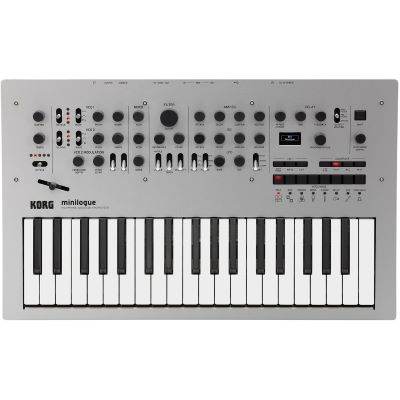
Direct controls for oscillator, filter, envelope and LFO make the signal path visible. A polyphonic synth such as the Korg minilogue is therefore a very clear introduction to subtractive sound design.

Explore Many Sound Worlds

Digital or Hybrid

MicroFreak, MiniFreak and wavetable synthesizers provide several oscillator models and flexible modulation. They are ideal if you want to explore classic and experimental sounds in one instrument.

1
Bass & Lead

Monophonic Synthesizer

Instruments such as Bass Station II or Monologue play one voice at a time. This deliberate limitation makes bass lines and lead sounds particularly direct and lets you concentrate on one sound at a time.

SEQ
Patterns & Mobile Ideas

Compact Synth with Sequencer

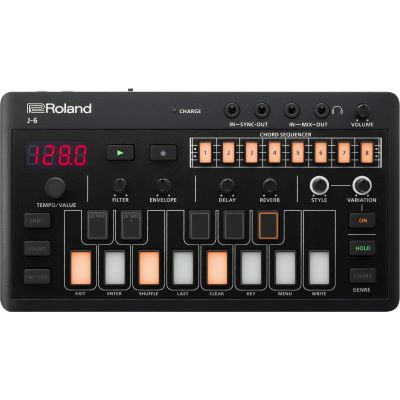
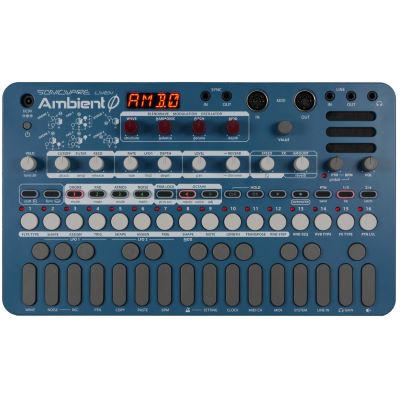
Roland J-6, Sonicware LIVEN and compact instruments such as the Korg Volca series combine sound generation with pattern-oriented work. This is a practical route for spontaneous electronic ideas without a large studio setup.

Beginner tip: do not automatically choose the synthesizer with the most functions. An instrument that lets you adjust oscillator, filter and envelope without navigating long menus will often teach the fundamentals faster.
Four Concepts Open Almost Every Synthesizer Door

How Is a Synthesizer Sound Created?

A simplified classic signal path can be written as: Oscillator → Filter → Amplifier → Effects / Output

01 · Source

The Oscillator Creates the Raw Material

An oscillator initially generates a waveform and pitch. Sawtooth, square and triangle waves contain different harmonic structures. Digital synthesizers can extend this idea with wavetables, FM, samples and other algorithms.

02 · Tone

The Filter Shapes the Frequency Range

A low-pass filter lets lower frequencies pass and increasingly reduces frequencies above the selected cutoff point. Resonance emphasises the area around that point. These two controls alone can dramatically change a static oscillator sound.

03 · Time

The Envelope Shapes How a Sound Develops

ADSR stands for Attack, Decay, Sustain and Release. These parameters can determine whether a sound starts immediately or fades in, what happens after the initial attack and how long the note continues after you release the key.

04 · Movement

The LFO Adds Repeating Motion

A Low Frequency Oscillator is normally used to modulate another parameter rather than being heard directly. Applied to pitch it can create vibrato, to volume tremolo and to filter cutoff a repeating timbral movement.

One Concept Connects the Entire Synth

Understanding Modulation

In simple terms, modulation means that one parameter automatically changes another. Envelopes, LFOs, velocity, the modulation wheel and aftertouch can function as modulation sources.

Once you understand the relationship between a modulation source and destination, more complex modulation matrices become much easier to understand.

No Technology Automatically Wins

Analog, Digital or Hybrid – Where Should You Start?

The synthesis method influences possibilities and workflow, but it does not automatically determine quality. For beginners, an understandable interface is often more important than whether an oscillator itself is generated in analog or digital form.

Concept Typical Character Strength for Learning Examples
Analog Classic oscillator and filter architecture Signal path is often easy to follow directly minilogue, Monologue, Bass Station II
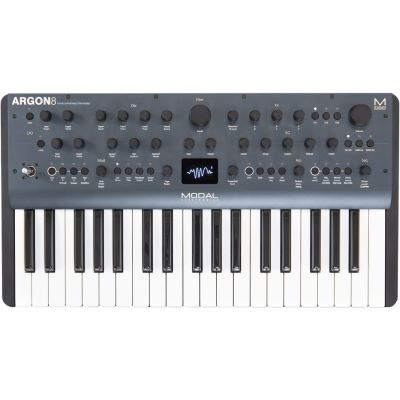
Digital Wavetables, modeling and many other methods Large tonal range Argon8, Roland J-6
Hybrid Combines digital and analog sections Several sound worlds in one instrument MicroFreak, MiniFreak
Semi-Modular Signal path can additionally be patched Deeper introduction to routing and CV MiniBrute 2, Grandmother, MS-20 Mini
One Voice or an Entire Chord

What Do Monophonic, Paraphonic and Polyphonic Mean?

One Voice

Monophonic

Only one note can sound at a time. This works extremely well for bass lines, lead sounds, sequences and classic acid or synth-bass parts.

Shared Architecture

Paraphonic

Several pitches can sound simultaneously but share certain parts of the sound-shaping architecture. The behaviour therefore differs from true independent polyphonic voices.

Several Independent Voices

Polyphonic

Several voices allow chords, pads and polyphonic melodies. Four voices are enough for simple chords, while six, eight or more voices provide more room for complex pads and longer releases.

Which is better for beginners? If you want to play chords and pads, a polyphonic synthesizer is especially versatile. If bass and lead sounds are your main interest, a monophonic synth can actually make the learning process more focused.
With a Keyboard or as a Sound Module?

Keyboard Synthesizer and Desktop Synthesizer Explained

Ready to Play

Synthesizer with Keyboard

Particularly straightforward as a first hardware synth: connect it, add headphones or speakers and start playing immediately. No additional controller is required for normal keyboard playing.

Compact Module

Desktop Synthesizer

A desktop synthesizer has no traditional piano-style keyboard. For melodic playing, you will normally use a MIDI keyboard, sequencer or DAW as the control source.

Beats & Patterns

Groove Box

If beats, several tracks and patterns are more important than learning one individual synthesizer architecture, a groove box may be the better starting point.

Complete Arrangement

Workstation

If you want to arrange complete songs using many instrument sounds rather than primarily building sounds from scratch, a workstation provides a different and more comprehensive concept.

Build Patterns without Perfect Keyboard Technique

Use Sequencers, Arpeggiators and Presets Productively

Step by Step

Step Sequencer

A step sequencer stores notes and, on many synthesizers, parameter movements as well. You can program a bass line first and then manipulate the filter or modulation in real time while the pattern continues to play.

Repeating Note Patterns

Arpeggiator

An arpeggiator turns held notes or chords into a repeating pattern. Especially at the beginning, this quickly creates a musical context in which changes to the filter and envelope become immediately audible.

Reverse Engineering

Presets Are Learning Material

There is no reason to avoid factory sounds. Select a preset and change only one section at a time. Afterwards, an empty Init sound is especially useful for building a bass, lead or pad step by step.

Do Not Confuse Audio with Control Data

Which Connections Does a First Synthesizer Need?

Sound

Audio Output

The actual synthesizer sound leaves the instrument through its audio output and can be routed to an audio interface, mixer, active speaker or amplifier.

Control Data

MIDI

MIDI carries performance and control information such as notes, velocity and controller data. MIDI itself is not the audible audio signal.

Computer Connection

USB

Many current synthesizers use USB to send MIDI to a computer. Some instruments additionally provide USB audio. This needs to be checked separately for the specific model.

Analog Control

CV / Gate / Sync

Analog control signals can connect compatible synthesizers, modular systems and sequencers. They are useful for expanding a hardware setup but are not essential for a first standalone synthesizer.

Before the first note: many synthesizers do not have built-in speakers. Plan suitable headphones, studio monitors, active speakers or an existing audio system according to the actual outputs of the instrument.
Your Music Style Helps Narrow the Choice

Which Synthesizer Fits Your Music?

Techno & Electro

Patterns, Bass & Filter Movement

Step sequencers, direct filter access and compact bass- and lead-oriented synthesizers make spontaneous electronic patterns especially easy to create.

Pop & Band

Polyphony and Playability

Polyphony, presets, splits, performance functions and a playable keyboard become more important than extreme modularity when the instrument has to cover several roles inside a band.

Ambient & Film Music

Voices, Modulation & Effects

More voices, complex modulation and effects are useful for slowly developing pads, drones and evolving atmospheric textures.

Experimental

Break Open the Signal Path

MicroFreak, semi-modular instruments and modular systems encourage you to move beyond conventional signal paths and create unusual modulation and routing combinations.

From the First Knob Turn to a Modular Setup

50 Suitable Products for Getting Started with Synthesizers

The selection is grouped by task. Desktop synthesizers and MIDI keyboards are deliberately listed separately because a synthesizer module without its own keyboard often requires an additional control source for traditional playing.

Make the Synthesizer Audible and Playable

Which Accessories Do Synthesizer Beginners Need?

Quiet Sound Design

Headphones

The simplest route to quiet sound design. Check the connector size and headphone output of the synthesizer before buying.

Desktop Modules

MIDI Keyboard

Useful for desktop modules without their own keys. Check whether both devices can communicate via DIN MIDI, a suitable USB-host connection or another compatible route.

Recording

Audio Interface

If you want to record the synthesizer into a computer, an audio interface connects its audio outputs with your recording software unless the synth itself provides suitable USB-audio functionality.

Complete Workspace

Stand & Cables

Keyboard synthesizers need a stable workspace. Suitable audio cables and, where necessary, MIDI cables complete the signal and control paths.

Start Simply and Learn by Listening

Typical Mistakes with a First Synthesizer

Mistake 1

Only Browsing Presets

Presets are useful, but regularly change the filter, envelope and modulation yourself. This is how selecting a sound becomes actual sound design.

Mistake 2

Starting Too Complex

A large modular system can be fascinating, but a clear signal path usually teaches the fundamental principles faster.

Mistake 3

Confusing MIDI with Audio

A MIDI connection normally carries no audible audio track. If you want to record the synth, the audio signal path has to be planned as well.

Mistake 4

Ignoring Polyphony

Anyone planning to play pads and chords will quickly encounter the deliberate limitations of a purely monophonic synthesizer.

Synthesizer Brands at Musikhaus Korn

Manufacturer Worlds for Analog and Digital Sound Design

Frequently Asked Questions before the First Synth

Answers about Getting Started with Synthesizers

Which Synthesizer Is Particularly Suitable for Beginners?
Instruments with direct access to the oscillator, filter, envelope and LFO are especially easy to understand. If you also want to play chords, choose a synthesizer with sufficient polyphony.
Is Analog or Digital Better for Beginners?
Both can work extremely well. Analog subtractive synthesizers often provide an easily understandable signal path, while digital instruments can provide many more synthesis methods within one device.
What Does an Oscillator Do?
It creates the raw material of the synthesizer sound. Pitch, waveform and additional oscillator parameters determine which frequencies are available to the next stages of the signal path.
What Does Filter Cutoff Do?
With a commonly used low-pass filter, cutoff determines the frequency region above which higher frequencies are increasingly reduced. The sound can therefore be changed from bright and open to darker and softer.
What Does ADSR Mean?
Attack, Decay, Sustain and Release describe four phases of an envelope. They can shape the way volume, filter position or another parameter changes over the duration of a note.
What Is an LFO?
A Low Frequency Oscillator creates a repeating modulation. It can automatically move parameters such as pitch, volume or filter cutoff.
What Does Monophonic or Polyphonic Mean?
A monophonic synthesizer plays one note at a time. A polyphonic synthesizer provides several voices and can therefore play chords and polyphonic pads.
Do I Need Keyboard Skills to Use a Synthesizer?
No. Sequencers and arpeggiators make it possible to create musical patterns with limited piano technique. Basic knowledge of notes, chords and rhythm still expands the possibilities significantly.
What Is a Step Sequencer?
It stores notes or events in individual steps of a pattern. Many synthesizers can additionally automate knob movements and parameter changes.
Does a Desktop Synthesizer Need a MIDI Keyboard?
Not always, because some devices have their own pads or sequencers. For conventional melodic playing, however, a compatible MIDI keyboard is very practical.
Can I Record a Synthesizer Directly into a Computer?
MIDI initially carries control data. For the audible signal, an audio interface is normally required unless the synthesizer itself provides a suitable USB-audio function.
Synthesizer, Workstation or Groove Box for a Beginner?
Choose a synthesizer if you mainly want to shape sounds yourself. A workstation is useful for complete arrangements with many instrument sounds. A groove box is often a better fit for beats, patterns and several tracks without a computer.
Try the Controls Yourself

Which Synthesizer Makes Sound Design Understandable to You?

Start on several instruments with the simplest sound you can create. Change only the oscillator waveform, filter cutoff, attack and release. If these steps are immediately understandable and make you want to keep experimenting, that operating concept is probably a better match than an instrument whose specification list is impressive only on paper.

From Your First Synth to Your Own Setup

Related Areas around Electronic Sound Generation

Sound Modules

Desktop Synthesizers

Discover compact sound modules without a traditional keyboard for existing MIDI and studio setups.

Beats & Patterns

Groove Boxes

Combine beats, bass, melodies and patterns in a standalone production instrument.

Complete Production

Workstations

Explore extensive sound libraries, sequencing and arrangement tools for complete productions.

Control

MIDI Keyboards

Play desktop synthesizers and virtual instruments with suitable keyboards, pads and controllers.

Understand Your Own Sounds Instead of Only Collecting Presets

Synthesizer for Beginners: Buying Guide & Sound Design

For a first synthesizer, a clear signal path and an interface with direct access are particularly valuable. Oscillator, filter, envelope and LFO form a foundation that can be transferred to many analog, digital and hybrid instruments. If you want to play chords and pads, pay attention to sufficient polyphony; for bass and lead, a monophonic synthesizer can be the more focused choice.

Also decide whether you need an integrated keyboard. A desktop synthesizer saves space but normally requires a MIDI controller for conventional playing. Sequencers and arpeggiators help you build patterns quickly, while audio, MIDI, USB and optionally CV connections determine how the setup can expand later. This creates a synthesizer system that can grow from your first self-programmed sound into a complete studio or live rig.

Choose More Instruments and Equipment with Confidence

From musical instruments and home-studio equipment to DJ and event technology, find further step-by-step buying help in the central Musikhaus Korn guide.